Appearance
过滤器、监听器、拦截器的区别
内容来源:本篇为学习整理,转载自网络技术博客(版权归原作者所有):
看在前面
一、过滤器
1.1 过滤器介绍
Servlet中的过滤器Filter是实现了javax.servlet.Filter接口的服务器端程序。主要的用途是过滤字符编码、做一些业务逻辑判断。其工作原理是,只要你在web.xml文件配置好要拦截的客户端请求,它都会帮你拦截到请求。此时你就可以对请求或相应(Request、Response)统一设置编码,简化操作。同时还可以做逻辑判断,例如用户是否已经登录、有没有权限访问该页面。
它是随着你的web应用启动而启动,只初始化一次。以后就可以拦截相关的请求。只有当你的web应用停止或重新部署的时候才能销毁。
在java.servlet.Filter接口中定义了3个方法:
java
package javax.servlet;

import java.io.IOException;

/**
 * A filter is an object that performs filtering tasks on either the
 * request to a resource (a servlet or static content), or on the response
 * from a resource, or both.
 *
 * <p>Filters perform filtering in the <code>doFilter</code> method.
 * Every Filter has access to a FilterConfig object from which it can obtain
 * its initialization parameters, and a reference to the ServletContext which
 * it can use, for example, to load resources needed for filtering tasks.
 *
 * <p>Filters are configured in the deployment descriptor of a web
 * application.
 *
 * <p>Examples that have been identified for this design are:
 * <ol>
 * <li>Authentication Filters
 * <li>Logging and Auditing Filters
 * <li>Image conversion Filters
 * <li>Data compression Filters
 * <li>Encryption Filters
 * <li>Tokenizing Filters
 * <li>Filters that trigger resource access events
 * <li>XSL/T filters
 * <li>Mime-type chain Filter
 * </ol>
 *
 * @since Servlet 2.3
 */

public interface Filter {

    /**
     * 用于完成过滤器的初始化
     *
     * Called by the web container to indicate to a filter that it is
     * being placed into service.
     *
     * <p>The servlet container calls the init
     * method exactly once after instantiating the filter. The init
     * method must complete successfully before the filter is asked to do any
     * filtering work.
     *
     * <p>The web container cannot place the filter into service if the init
     * method either
     * <ol>
     * <li>Throws a ServletException
     * <li>Does not return within a time period defined by the web container
     * </ol>
     */
    public void init(FilterConfig filterConfig) throws ServletException;


    /**
     * 实现过滤功能,该方法对每个请求增加额外的处理
     *
     * The <code>doFilter</code> method of the Filter is called by the
     * container each time a request/response pair is passed through the
     * chain due to a client request for a resource at the end of the chain.
     * The FilterChain passed in to this method allows the Filter to pass
     * on the request and response to the next entity in the chain.
     *
     * <p>A typical implementation of this method would follow the following
     * pattern:
     * <ol>
     * <li>Examine the request
     * <li>Optionally wrap the request object with a custom implementation to
     * filter content or headers for input filtering
     * <li>Optionally wrap the response object with a custom implementation to
     * filter content or headers for output filtering
     * <li>
     * <ul>
     * <li><strong>Either</strong> invoke the next entity in the chain
     * using the FilterChain object
     * (<code>chain.doFilter()</code>),
     * <li><strong>or</strong> not pass on the request/response pair to
     * the next entity in the filter chain to
     * block the request processing
     * </ul>
     * <li>Directly set headers on the response after invocation of the
     * next entity in the filter chain.
     * </ol>
     */
    public void doFilter(ServletRequest request, ServletResponse response,
                         FilterChain chain)
            throws IOException, ServletException;


    /**
     * 用于过滤器销毁前,完成某些资源的回收
     *
     * Called by the web container to indicate to a filter that it is being
     * taken out of service.
     *
     * <p>This method is only called once all threads within the filter's
     * doFilter method have exited or after a timeout period has passed.
     * After the web container calls this method, it will not call the
     * doFilter method again on this instance of the filter.
     *
     * <p>This method gives the filter an opportunity to clean up any
     * resources that are being held (for example, memory, file handles,
     * threads) and make sure that any persistent state is synchronized
     * with the filter's current state in memory.
     */
    public void destroy();
}
1.2 自定义过滤器:
java
import java.io.IOException;

import javax.servlet.Filter;
import javax.servlet.FilterChain;
import javax.servlet.FilterConfig;
import javax.servlet.ServletException;
import javax.servlet.ServletRequest;
import javax.servlet.ServletResponse;
import javax.servlet.http.HttpServletRequest;
import javax.servlet.http.HttpServletResponse;

public class FilterUtil implements Filter {

	private FilterConfig filterConfig;

	@Override
	public void init(FilterConfig filterConfig) throws ServletException {
		this.filterConfig = filterConfig;
		System.out.println("过滤器Filter初始化");
	}

	@Override
	public void doFilter(ServletRequest request, ServletResponse response, FilterChain filterChain) throws IOException, ServletException {
		if (!(request instanceof HttpServletRequest) || !(response instanceof HttpServletResponse)) {
			throw new ServletException("FilterUtil just supports HTTP requests");
		}

		HttpServletRequest httpServletRequest = (HttpServletRequest) request;
		HttpServletResponse httpServletResponse = (HttpServletResponse) response;
		httpServletRequest.setCharacterEncoding(this.filterConfig.getInitParameter("encoding"));
		httpServletResponse.setCharacterEncoding(this.filterConfig.getInitParameter("encoding"));
		filterChain.doFilter(httpServletRequest, httpServletResponse);
	}

	@Override
	public void destroy() {
		System.out.println("过滤器Filter销毁");
	}

}
web.xml配置:
java
<filter>
     <filter-name>encodingFilter</filter-name>
     <!-- <filter-class>org.springframework.web.filter.CharacterEncodingFilter</filter-class> -->
     <filter-class>com.cn.util.FilterUtil</filter-class>
     <async-supported>true</async-supported>
     <init-param>
         <param-name>encoding</param-name>
         <param-value>UTF-8</param-value>
     </init-param>
</filter>

<filter-mapping>
     <filter-name>encodingFilter</filter-name>
     <url-pattern>/*</url-pattern>
</filter-mapping>
1.3 filter的实际应用
过滤器只需要继承javax.servlet.filter即可。一般来说我们只要添加tomcat运行时环境就能够包含javax.servlet的jar包。但是eclipse在tomcat8中没有找到,tomcat8中确实没有,只有通过maven来添加了:
java
<!-- https://mvnrepository.com/artifact/javax.servlet/servlet-api -->
 <dependency>
 <groupId>javax.servlet</groupId>
 <artifactId>servlet-api</artifactId>
 <version>2.5</version>
 </dependency>

<!-- https://mvnrepository.com/artifact/javax.servlet/jsp-api -->
 <dependency>
 <groupId>javax.servlet</groupId>
 <artifactId>jsp-api</artifactId>
 <version>2.0</version>
 </dependency>
1.3.1 请求编码转换
java
import java.io.IOException;
import java.util.HashMap;
import java.util.Map;

import javax.servlet.Filter;
import javax.servlet.FilterChain;
import javax.servlet.FilterConfig;
import javax.servlet.ServletException;
import javax.servlet.ServletRequest;
import javax.servlet.ServletResponse;

import org.slf4j.Logger;
import org.slf4j.LoggerFactory;

public class urlEncodeFilter implements Filter{

    Logger logger = LoggerFactory.getLogger(urlEncodeFilter.class);
    Map<String,Object> paramMap = new HashMap<String,Object>();

	 @Override
	 public void destroy() {
		}

	 @Override
	 public void doFilter(ServletRequest arg0, ServletResponse arg1,
				FilterChain arg2) throws IOException, ServletException {
			System.out.println("urlEncodeFilter doFilter..."+paramMap.get("urlEncode").toString());
			arg0.setCharacterEncoding(paramMap.get("urlEncode").toString());
			arg2.doFilter(arg0, arg1);
		}

	 @Override
	 public void init(FilterConfig arg0) throws ServletException {
        String urlEncode = arg0.getInitParameter("urlEncode");
        paramMap.put("urlEncode",urlEncode);
    }

}
web.xml配置:
java
 <filter>
	 <filter-name>urlEncodeFilter</filter-name>
	 <filter-class>com.mycompany.mvc.filter.urlEncodeFilter</filter-class>
 <init-param>
	 <param-name>urlEncode</param-name>
	 <param-value>UTF-8</param-value>
 </init-param>
filter
java
<filter-mapping>
	<filter-name>urlEncodeFilter</filter-name>
	<url-pattern>/*</url-pattern>
</filter-mapping>
1.3.2 日志记录,比如记录所有对网站发起请求的地址
java
import java.io.IOException;

import javax.servlet.Filter;
import javax.servlet.FilterChain;
import javax.servlet.FilterConfig;
import javax.servlet.ServletException;
import javax.servlet.ServletRequest;
import javax.servlet.ServletResponse;
import javax.servlet.http.HttpServletRequest;

import org.slf4j.Logger;
import org.slf4j.LoggerFactory;

public class logFilter implements Filter{

    Logger logger = LoggerFactory.getLogger(logFilter.class);

	@Override
	public void destroy() {

    }

	@Override
	public void doFilter(ServletRequest arg0, ServletResponse arg1,
            FilterChain arg2) throws IOException, ServletException {
        HttpServletRequest request = (HttpServletRequest)arg0;
        System.out.println("logFilter doFilter servletPath:"+request.getRemoteHost());
        arg2.doFilter(arg0, arg1);
    }

	@Override
	public void init(FilterConfig arg0) throws ServletException {

	}

}
web.xml:
java
<filter>
	<filter-name>logFilter</filter-name>
	<filter-class>com.mycompany.mvc.filter.logFilter</filter-class>
</filter>

<filter-mapping>
	<filter-name>logFilter</filter-name>
	<url-pattern>/*</url-pattern>
</filter-mapping>
1.3.4 对未登录用户的判断
java
import java.io.IOException;

import javax.servlet.Filter;
import javax.servlet.FilterChain;
import javax.servlet.FilterConfig;
import javax.servlet.ServletException;
import javax.servlet.ServletRequest;
import javax.servlet.ServletResponse;
import javax.servlet.http.HttpServletRequest;
import javax.servlet.http.HttpSession;

import org.apache.commons.lang.StringUtils;

import com.mycompany.mvc.utils.Constant;

public class loginFilter implements Filter{

 private String dispatchUrl = "";
 private String excludeUrl = "";

 @Override
 public void destroy() {

    }

 @Override
 public void doFilter(ServletRequest arg0, ServletResponse arg1, FilterChain arg2)
 throws IOException, ServletException {
        HttpServletRequest request = (HttpServletRequest)arg0;
        String servletPath = request.getServletPath();

        HttpSession session = request.getSession();
        String sessionKey = (String) session.getAttribute(Constant.SESSIONKEY);

		/*就是登陆界面不进行过滤*/
		if(servletPath.equals(dispatchUrl) || servletPath.equals(excludeUrl)){
				arg2.doFilter(arg0, arg1);
			}else{
		if(!StringUtils.isEmpty(sessionKey)){
                arg2.doFilter(arg0, arg1);
            }else{
                request.getRequestDispatcher(dispatchUrl).forward(arg0, arg1);
            }
        }
    }

    @Override
    public void init(FilterConfig arg0) throws ServletException {
        dispatchUrl = arg0.getInitParameter("dispatchUrl");
        excludeUrl = arg0.getInitParameter("excludeUrl");
    }

}
web.xml:
java
<filter>
 <filter-name>loginFilter</filter-name>
 <filter-class>com.mycompany.mvc.filter.loginFilter</filter-class>

 <init-param>
	 <!--         不进行过滤的url,因为它就是跳转到登陆界面, -->
	 <param-name>excludeUrl</param-name>
	 <param-value>/main</param-value>
 </init-param>

 <init-param>
	 <!--         未登录用户跳转的url -->
	 <param-name>dispatchUrl</param-name>
	 <param-value>/system/login</param-value>
 </init-param>
</filter>

<filter-mapping>
	<filter-name>loginFilter</filter-name>
	<url-pattern>/*</url-pattern>
</filter-mapping>
之所以上面的/main能够直接跳转到index这个登录界面,是因为SpringMvc中配置了这个(上篇文章有讲述到):
java
<mvc:view-controller path="${adminPath}" view-name="index"/>它的意思就是不经过controller层,直接把index放入ModelAndView,然后由渲染层渲染。 讲到这里,再结合上面说到的拦截器,我们发现,这个时候拦截器还是能够拦截2次的。就是视图渲染前和渲染后。但是进入controller层之前肯定拦截不到了,因为请求根本就没有进入controller。
systemAction:
java
import javax.servlet.http.HttpServletRequest;
import javax.servlet.http.HttpSession;

import org.springframework.stereotype.Controller;
import org.springframework.web.bind.annotation.RequestMapping;
import org.springframework.web.servlet.ModelAndView;

@Controller
@RequestMapping("/system")
public class systemAction {

	@RequestMapping("/login")
	public ModelAndView login(HttpServletRequest request){
        ModelAndView mv = new ModelAndView();
        HttpSession session = request.getSession();
 		/*假设用户输入的用户名密码正确,则放入sessionKey中,对应的value可以
         * 是User对象,这里以字符串"test"代替*/
        session.setAttribute("sessionKey","test");
        mv.setViewName("login");
 	   return mv;
    }

	 @RequestMapping("/view")
	 public ModelAndView view(HttpServletRequest request){
			ModelAndView mv = new ModelAndView();
			mv.setViewName("view");
		   return mv;
	 }

}
Constant.java:
java
public class Constant {

	public static final String SESSIONKEY = "sessionKey";

}
二、监听器
2.1 监听器介绍
Servlet的监听器Listener,它是实现了javax.servlet.ServletContextListener接口的服务器端程序,它也是随web应用的启动而启动,只初始化一次,随web应用的停止而销毁。主要作用是:做一些初始化的内容添加工作、设置一些基本的内容、比如一些参数或者是一些固定的对象等等。
在javax.servlet.ServletContextListener接口中定义了2种方法:
java
package javax.servlet;

import java.util.EventListener;

/**
 * Interface for receiving notification events about ServletContext
 * lifecycle changes.
 *
 * In order to receive these notification events, the implementation
 * class must be either declared in the deployment descriptor of the web
 * application, annotated with {@link javax.servlet.annotation.WebListener},
 * or registered via one of the addListener methods defined on
 * {@link ServletContext}.
 *
 * Implementations of this interface are invoked at their
 * {@link #contextInitialized} method in the order in which they have been
 * declared, and at their {@link #contextDestroyed} method in reverse
 * order.
 *
 * @see ServletContextEvent
 *
 * @since Servlet 2.3
 */
public interface ServletContextListener extends EventListener {

    /**
     * Receives notification that the web application initialization
     * process is starting.
     *
     * All ServletContextListeners are notified of context
     * initialization before any filters or servlets in the web
     * application are initialized.
     *
     * @param sce the ServletContextEvent containing the ServletContext
     * that is being initialized
     */
    public void contextInitialized(ServletContextEvent sce);

    /**
     * Receives notification that the ServletContext is about to be
     * shut down.
     *
     * All servlets and filters will have been destroyed before any
     * ServletContextListeners are notified of context
     * destruction.
     *
     * @param sce the ServletContextEvent containing the ServletContext
     * that is being destroyed
     */
    public void contextDestroyed(ServletContextEvent sce);
}
2.2 自定义监听器:
java
import javax.servlet.ServletContextEvent;
import javax.servlet.ServletContextListener;

public class ServletContextListenerUtil implements ServletContextListener {

	/**
	 * 项目启动时,先启动监听器,再启动过滤器。
	 */

	@Override
	public void contextInitialized(ServletContextEvent sce) {
		System.out.println("监听器ServletContextListenerUtil初始化");
	}

	@Override
	public void contextDestroyed(ServletContextEvent sce) {
		System.out.println("监听器ServletContextListenerUtil销毁");
	}

}
2.3 listener实际应用
listener具体分为八种,能够监听包括request域,session域,application域的产生,销毁和属性的变化;
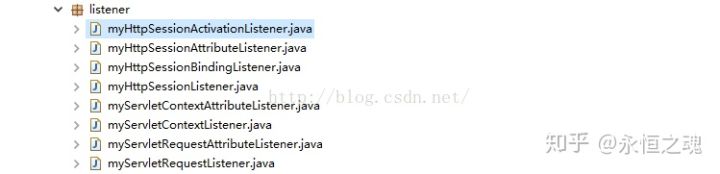
具体使用,可以看之前转载一篇文章(再次感谢"孤傲苍狼",他的主页http://www.cnblogs.com/xdp-gacl/):<a href="https://blog.csdn.net/Jintao_Ma/article/details/51464124">http://blog.csdn.net/Jintao_Ma......</a>
在配置完然后我们在web.xml中诸如下面的配置即可:
java
<listener> <listener-class>
        com.mycompany.mvc.listener.myServletContextListener
 </listener-class>
</listener>

<listener>
 <listener-class>
        com.mycompany.mvc.listener.myServletContextAttributeListener
 </listener-class>
</listener>
2.4.1 获取当前在线人数
java
import javax.servlet.http.HttpSessionEvent;
import javax.servlet.http.HttpSessionListener;

public class myHttpSessionListener implements HttpSessionListener{

 public static int peopleOnLine = 0;

 @Override
 public void sessionCreated(HttpSessionEvent arg0) {
        System.out.println("myHttpSessionListener.sessionCreated():"+arg0);
        peopleOnLine++;
        arg0.getSession().setAttribute("peopleOnLine",peopleOnLine);
    }

 @Override
 public void sessionDestroyed(HttpSessionEvent arg0) {
        System.out.println("myHttpSessionListener.sessionDestroyed():"+arg0);
        peopleOnLine--;
        arg0.getSession().setAttribute("peopleOnLine",peopleOnLine);
    }
}
在页面中就可以获取:
当前在线人数:当前在线人数:
<%=session.getAttribute("peopleOnLine")%>
其实也可以获得历史所有在线人数,只需要把历史所有在线人数保存在文件中,然后每次项目启动读取这个文件,当前人数增加时,把历史所有人数也相应增加,项目关闭时,再保存起来。
<h4>在系统初始化时,获取项目绝对路径</h4>
如下,获得绝对路径后保存到系统变量System中:
java
@Override
public void contextInitialized(ServletContextEvent servletContext) {
    System.out.println("myServletContextListener.contextInitialized()");
    System.setProperty("realPath", servletContext.getServletContext().getRealPath("/"));
    System.out.println("myServletContextListener.contextInitialized()");
}
三、拦截器
3.1 拦截器介绍
拦截器是在面向切面编程中应用的,就是在你的service或者一个方法前调用一个方法,或者在方法后调用一个方法比如动态代理就是拦截器的简单实现,在你调用方法前打印出字符串(或者做其它业务逻辑的操作),也可以在你调用方法后打印出字符串,甚至在你抛出异常的时候做业务逻辑的操作。拦截器不是在web.xml配置的,比如struts在struts.xml配置,在springMVC在spring与springMVC整合的配置文件中配置。
在springmvc中,定义拦截器要实现HandlerInterceptor接口,并实现该接口中提供的三个方法。其中HandlerInterceptor接口源码如下:
java
public interface HandlerInterceptor {

	/**
	 * Intercept the execution of a handler. Called after HandlerMapping determined
	 * an appropriate handler object, but before HandlerAdapter invokes the handler.
	 * DispatcherServlet processes a handler in an execution chain, consisting
	 * of any number of interceptors, with the handler itself at the end.
	 * With this method, each interceptor can decide to abort the execution chain,
	 * typically sending a HTTP error or writing a custom response.
	 * **Note:** special considerations apply for asynchronous
	 * request processing. For more details see
	 * {@link org.springframework.web.servlet.AsyncHandlerInterceptor}.
	 * @param request current HTTP request
	 * @param response current HTTP response
	 * @param handler chosen handler to execute, for type and/or instance evaluation
	 * @return {@code true} if the execution chain should proceed with the
	 * next interceptor or the handler itself. Else, DispatcherServlet assumes
	 * that this interceptor has already dealt with the response itself.
	 * @throws Exception in case of errors
	 */
	boolean preHandle(HttpServletRequest request, HttpServletResponse response, Object handler)
			throws Exception;

	/**
	 * Intercept the execution of a handler. Called after HandlerAdapter actually
	 * invoked the handler, but before the DispatcherServlet renders the view.
	 * Can expose additional model objects to the view via the given ModelAndView.
	 * DispatcherServlet processes a handler in an execution chain, consisting
	 * of any number of interceptors, with the handler itself at the end.
	 * With this method, each interceptor can post-process an execution,
	 * getting applied in inverse order of the execution chain.
	 * **Note:** special considerations apply for asynchronous
	 * request processing. For more details see
	 * {@link org.springframework.web.servlet.AsyncHandlerInterceptor}.
	 * @param request current HTTP request
	 * @param response current HTTP response
	 * @param handler handler (or {@link HandlerMethod}) that started asynchronous
	 * execution, for type and/or instance examination
	 * @param modelAndView the {@code ModelAndView} that the handler returned
	 * (can also be {@code null})
	 * @throws Exception in case of errors
	 */
	void postHandle(
			HttpServletRequest request, HttpServletResponse response, Object handler, ModelAndView modelAndView)
			throws Exception;

	/**
	 * Callback after completion of request processing, that is, after rendering
	 * the view. Will be called on any outcome of handler execution, thus allows
	 * for proper resource cleanup.
	 * Note: Will only be called if this interceptor's {@code preHandle}
	 * method has successfully completed and returned {@code true}!
	 * As with the {@code postHandle} method, the method will be invoked on each
	 * interceptor in the chain in reverse order, so the first interceptor will be
	 * the last to be invoked.
	 * **Note:** special considerations apply for asynchronous
	 * request processing. For more details see
	 * {@link org.springframework.web.servlet.AsyncHandlerInterceptor}.
	 * @param request current HTTP request
	 * @param response current HTTP response
	 * @param handler handler (or {@link HandlerMethod}) that started asynchronous
	 * execution, for type and/or instance examination
	 * @param ex exception thrown on handler execution, if any
	 * @throws Exception in case of errors
	 */
	void afterCompletion(
			HttpServletRequest request, HttpServletResponse response, Object handler, Exception ex)
			throws Exception;

}
3.2 自定义拦截器如下:
java
import javax.servlet.http.HttpServletRequest;
import javax.servlet.http.HttpServletResponse;
import org.springframework.web.servlet.HandlerInterceptor;
import org.springframework.web.servlet.ModelAndView;

public class InterceptorUtil implements HandlerInterceptor{

 //进入Handler方法之前执行
 //可以用于身份认证、身份授权。如果认证没有通过表示用户没有登陆,需要此方法拦截不再往下执行,否则就放行
 @Override
 public boolean preHandle(HttpServletRequest request,
            HttpServletResponse response, Object handler) throws Exception {
 	// TODO Auto-generated method stub
        System.out.println("InterceptorUtil...........preHandle");
        String user= (String) request.getSession().getAttribute("user");
	if(user != null){
	    return true;
	}

	request.getRequestDispatcher("/WEB-INF/jsp/index.jsp").forward(request, response);
	//true表示放行,false表示不放行
	return false;
 }

 @Override
 public void postHandle(HttpServletRequest request,
            HttpServletResponse response, Object handler,
            ModelAndView modelAndView) throws Exception {
 	// TODO Auto-generated method stub
 }

 @Override
 public void afterCompletion(HttpServletRequest request,
            HttpServletResponse response, Object handler, Exception ex)
 throws Exception {
 	// TODO Auto-generated method stub
        System.out.println("InterceptorUtil...........afterCompletion");
 }

}
preHandle方法:进入Handler方法之前执行。可以用于身份认证、身份授权。比如如果认证没有通过表示用户没有登陆,需要此方法拦截不再往下执行(return false),否则就放行(return true)。
postHandle方法:进入Handler方法之后,返回ModelAndView之前执行。可以看到该方法中有个modelAndView的形参。应用场景:从modelAndView出发:将公用的模型数据(比如菜单导航之类的)在这里传到视图,也可以在这里同一指定视图。
afterCompletion方法:执行Handler完成之后执行。应用场景:统一异常处理,统一日志处理等。
在springmvc中,拦截器是针对具体的HandlerMapping进行配置的,也就是说如果在某个HandlerMapping中配置拦截,经过该 HandlerMapping映射成功的handler最终使用该拦截器。
spring-mvc.xml配置文件中:
java
<!-- 拦截器配置 -->
 <mvc:interceptors>
 <!--多个拦截器,顺序执行 -->
 <!-- 登陆认证拦截器 -->
 <mvc:interceptor>
 <!-- /** 表示拦截所有url包括子url路径,/*只拦截根下的url -->
 <mvc:mapping path="/**"/>
 <bean class="com.cn.util.InterceptorUtil"></bean>
 </mvc:interceptor>
 <!-- 其他拦截器 -->
 </mvc:interceptors>
3.3 过滤器和拦截器的区别
- 拦截器是基于Java的反射机制的,而过滤器是基于函数回调
- 过滤器依赖与servlet容器,而拦截器不依赖与servlet容器
- 拦截器只能对action请求起作用,而过滤器则可以对几乎所有的请求起作用
- 拦截器可以访问action上下文、值栈里的对象,而过滤器不能
- 在action的生命周期中,拦截器可以多次被调用,而过滤器只能在容器初始化时被调用一次
3.4 过滤器执行顺序
过滤前 - 拦截前 - Action处理 - 拦截后 -过滤后。个人认为过滤是一个横向的过程,首先把客户端提交的内容进行过滤(例如未登录用户不能访问内部页面的处理);过滤通过后,拦截器将检查用户提交数据的验证,做一些前期的数据处理,接着把处理后的数据发给对应的Action;Action处理完成返回后,拦截器还可以做其他过程,再向上返回到过滤器的后续操作。
过滤器(Filter):当你有一堆东西的时候,你只希望选择符合你要求的某一些东西。定义这些要求的工具,就是过滤器。
拦截器(Interceptor):在一个流程正在进行的时候,你希望干预它的进展,甚至终止它进行,这是拦截器做的事情。
监听器(Listener):当一个事件发生的时候,你希望获得这个事件发生的详细信息,而并不想干预这个事件本身的进程,这就要用到监听器。
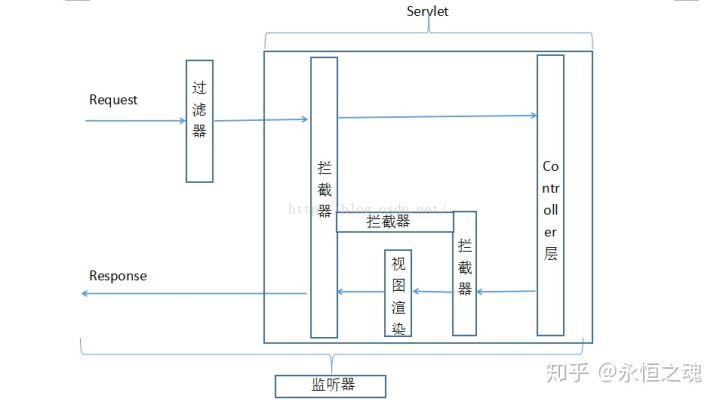
servlet:就是对request和response进行处理的容器,它在filter之后执行,servlet其中的一部分就是controller层(标记为servlet_2),还包括渲染视图层(标记为servlet_3)和进入controller之前系统的一些处理部分(servlet_1),另外我们把servlet开始的时刻标记为servlet_0,servlet结束的时刻标记为servlet_4。
拦截器(interceptor):就是对请求和返回进行拦截,它作用在servlet的内部,具体来说有三个地方:
servlet_1和servlet_2之间,即请求还没有到controller层
servlet_2和servlet_3之间,即请求走出controller层次,还没有到渲染时图层
servlet_3和servlet_4之间,即结束视图渲染,但是还没有到servlet的结束
它们之间的关系,可以用一张图来表示:
拦截器这个要详细讲述一下了,上一篇文章说到,Spring的配置文件应该扫描service层及以下,SpringMvc的配置文件应该扫描controller层; 我们在service层如果想做日志的话,可以使用spring aop特性,在spring.xml中配置aspect即可,那么如果想在controller层做日志,相应地,在SpringMvc.xml中应该怎么配置呢?
这个时候就需要拦截器,它其实也是一种aop的实现(aop本身是一种思想),而且这种实现本质上和aspect是一样的,只是做了更多的事情,我们当然可以在SpringMvc.xml中也配置aspect,不过现在有一个更好的实现,为什么不用呢。
关于拦截器细节,可以参考这篇文章:<a href="https://www.iteye.com/blog/elim-1750680">http://elim.iteye.com/blog/175...</a>
3.5 拦截器的实际应用
3.5.1 可以全局做日志
java
import java.lang.reflect.Method;

import javax.servlet.http.HttpServletRequest;
import javax.servlet.http.HttpServletResponse;

import org.springframework.web.method.HandlerMethod;
import org.springframework.web.servlet.HandlerInterceptor;
import org.springframework.web.servlet.ModelAndView;

/**@Description
 * logInterceptor公共拦截器,做日志记录
 */
public class logInterceptor implements HandlerInterceptor{

	@Override
	public void afterCompletion(HttpServletRequest arg0, HttpServletResponse arg1, Object arg2, Exception arg3)
	throws Exception {
		/*做一些清理工作*/
	}

	@Override
	public void postHandle(HttpServletRequest arg0, HttpServletResponse arg1, Object arg2, ModelAndView arg3)  throws Exception {
		System.out.println("logInterceptor.postHandle()---view Name:"+arg3.getViewName());
	}

	@Override
	public boolean preHandle(HttpServletRequest arg0, HttpServletResponse arg1, Object arg2) throws Exception {
		/*取得调用的controller方法等*/
		if(arg2 instanceof HandlerMethod){
			HandlerMethod hMethod = (HandlerMethod)arg2;
			Method method = hMethod.getMethod();
			System.out.println("logInterceptor.preHandle()--method Name:"+method.getName());
		}
		return true;
	}

}
3.5.2 记录部分调用的时间
java
import javax.servlet.http.HttpServletRequest;
import javax.servlet.http.HttpServletResponse;

import org.springframework.web.servlet.HandlerInterceptor;
import org.springframework.web.servlet.ModelAndView;

/**@Description
 * 登陆时间拦截器,记录用户登录时间
 *
 */
public class timeInterceptor implements HandlerInterceptor{

	@Override
	public boolean preHandle(HttpServletRequest request, HttpServletResponse response, Object handler)
	throws Exception {
		return true;
	}

	@Override
	public void postHandle(HttpServletRequest request, HttpServletResponse response, Object handler,
				ModelAndView modelAndView) throws Exception {
	System.out.println("timeInterceptor.postHandle()--time:"+System.currentTimeMillis());
	}

	@Override
	public void afterCompletion(HttpServletRequest request, HttpServletResponse response, Object handler, Exception ex)  throws Exception {
	}

}
上述两个拦截器功能的配置如下,SpringMvc.xml:
java
<!-- 拦截器配置 -->
<mvc:interceptors>

	 <bean class="com.mycompany.mvc.interceptor.logInterceptor"></bean>

	 <mvc:interceptor>
		 <mvc:mapping path="/system/view"/>
		 <bean class="com.mycompany.mvc.interceptor.timeInterceptor"></bean>
	 </mvc:interceptor>

</mvc:interceptors>
四、过滤器、监听器、拦截器使用原则
对整个流程清楚之后,然后就是各自的使用,在使用之前应该有一个使用规则,为什么这个说,因为有些功能比如判断用户是否登录,既可以用过滤器,也可以用拦截器,用哪一个才是合理的呢?那么如果有一个原则,使用起来就会更加合理。实际上这个原则是有的:
把整个项目的流程比作一条河,那么监听器的作用就是能够听到河流里的所有声音,过滤器就是能够过滤出其中的鱼,而拦截器则是拦截其中的部分鱼,并且作标记。所以当需要监听到项目中的一些信息,并且不需要对流程做更改时,用监听器;当需要过滤掉其中的部分信息,只留一部分时,就用过滤器;当需要对其流程进行更改,做相关的记录时用拦截器。